Weapon Stats#
NinjinTooltip displays comprehensive weapon statistics directly in your inventory tooltip, helping you make informed decisions about which weapons to use.

Weapon stats displayed in inventory tooltip
Advanced Stats Menu#
Use the hotkey assigned in DayZ Hotkeys → NinjinsMods → Advanced Stats Menu on any weapon to open the Advanced Stats Menu, which displays comprehensive weapon statistics including compatible repair kits.
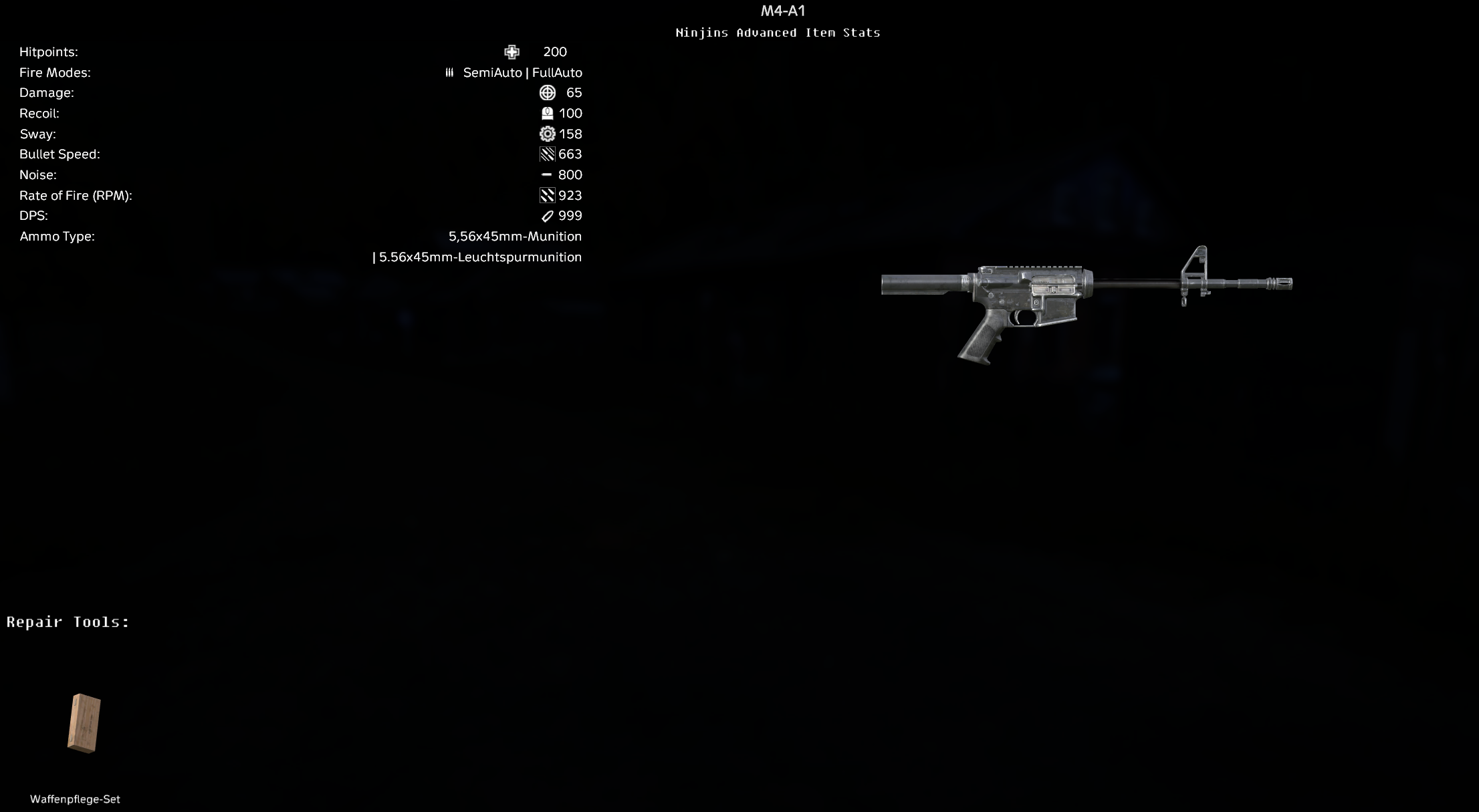
Advanced Stats Menu showing detailed weapon stats and repair tools
Displayed Statistics#
Fire Modes#
Shows all available fire modes for the weapon (e.g., "Single | SemiAuto | FullAuto").
Recoil#
Displays the weapon's recoil value, calculated from the recoilModifier property. This value accounts for attachments that modify recoil (like grips and stocks).
- Lower values indicate less recoil (better control)
- Values are calculated as a percentage
- Attachment modifiers are automatically factored in
Sway#
Shows weapon sway statistics based on the swayModifier property. Like recoil, this accounts for attachments.
- Lower values mean less weapon sway
- Affected by weapon attachments (bipods, grips)
Handling#
Displays the weapon's handling value, derived from the adsModifier (Aim Down Sights modifier).
- Affects how quickly you can aim down sights
- Lower values typically mean faster ADS time
- Only shown if the value differs from default (100%)
Bullet Speed#
Calculated bullet velocity based on:
- Ammunition's
initSpeed - Weapon's
WeaponLength - Formula:
bulletSpeed × weaponLength
This affects bullet drop and travel time to target.
Damage#
Calculated weapon damage based on:
- Bullet damage from ammunition config
- Weapon's
initSpeedMultiplier - Bullet's
typicalSpeedandBTdefaultDamageOverride - Formula accounts for actual bullet velocity vs typical velocity
Note: This is calculated damage, not necessarily the exact damage dealt in-game due to various factors like range, armor, etc.
Rate of Fire (RPM)#
Displays rounds per minute based on the weapon's reloadTime:
- Checked in order: FullAuto → SemiAuto → Single
- Formula:
60 / reloadTime - Only shown if damage is displayed (requires loaded ammunition)
DPS (Damage Per Second)#
Calculated damage per second:
- Formula:
(Damage per shot) × (Rounds per minute) / 60 - Only shown if both damage and rate of fire are available
- Useful for comparing sustained damage output
Noise#
Displays weapon noise level with suppressor modifiers applied:
- Base noise from weapon's
NoiseShoot strength - Suppressor modifiers are automatically applied if a suppressor is attached
- Formula accounts for
noiseShootModifierfrom suppressor - Displayed as:
baseNoise × (1 + suppressorModifier)
Example: If base noise is 80 and suppressor has -0.93 modifier, final noise = 80 × (1 + (-0.93)) = 80 × 0.07 = 5.6
Ammo Type#
Lists all compatible ammunition types for the weapon, displayed as a multi-line list separated by " | ".
Attachment Modifiers#
Many weapon stats automatically account for attached modifications:
- Recoil: Modified by grips, stocks, and other attachments
- Sway: Affected by bipods, grips, and stocks
- Handling: Influenced by various attachments
- Noise: Reduced by suppressors
The tooltip shows the final calculated values with all attachments applied, giving you an accurate representation of the weapon's performance as currently configured.
Armor Damage Calculation#
If you have armor equipped and the weapon has calculated damage, the tooltip will show:
- "vs Armor" - Shows how much damage the weapon will deal to you through your best armor piece
- Calculated using the weapon's damage and your armor's projectile protection values
- Only shown if
ShowArmorDamageis enabled in config