Food Stats#
NinjinTooltip displays detailed nutritional information for food items, helping you make informed decisions about what to eat.
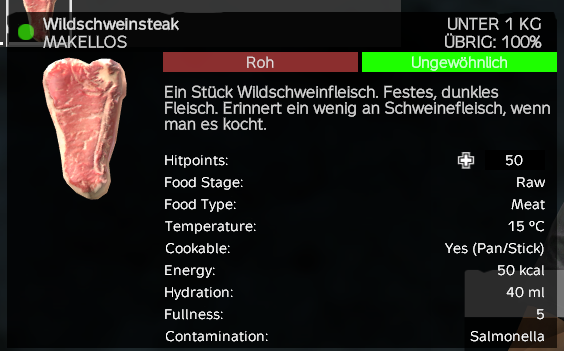
Food Information#
Food Stage#
Shows the current stage of the food item (if applicable):
- Raw - Uncooked food
- Baked - Cooked in an oven
- Boiled - Cooked in a pot
- Dried - Dried food
- Burnt - Overcooked food
Different stages may have different nutritional values.
Food Type#
Displays the category of food:
- Meat - Animal meat
- Fruit - Fruits and berries
- Mushroom - Mushrooms
- Corpse - Human corpses
Temperature#
Shows the current temperature of the food item in Celsius (°C), if the item can have temperature.
- Hot food provides warmth
- Cold food may reduce body temperature
Cookable#
Indicates whether the food can be cooked and how:
- Yes (Pan) - Can be cooked in a frying pan
- Yes (Stick) - Can be cooked on a stick over fire
- Yes (Pan/Stick) - Can be cooked using either method
Nutritional Values#
Energy#
Displays energy content in kilocalories (kcal). This affects your hunger level.
Hydration#
Shows water content in milliliters (ml). This affects your thirst level.
Fullness#
Displays the fullness index, which affects how full you feel after eating.
Digestibility#
Shows how quickly the food is processed in your stomach. Higher values mean faster digestion.
Nutritional Quality#
Displays nutritional quality as a percentage. Only shown if the value is less than 99% (most items are hardcoded to 100%).
Note: This stat doesn't actually affect gameplay in current DayZ versions.
Negative Effects#
Toxicity#
Shows the toxicity level of the food. Higher values indicate more toxic food that may cause negative effects.
Contamination#
Lists diseases and agents that the food may contain:
- Cholera
- Influenza
- Salmonella
- Brain Disease
- Food Poison
- Chemical Poison
- Wound Infection
- Nerve Agent
- Heavy Metal
Displayed as a comma-separated list if multiple agents are present.
Nutritional Profile#
The tooltip reads nutritional data from the item's NutritionalProfile, which accounts for:
- Food stage (raw, baked, boiled, etc.)
- Item type and base nutritional values
- Current state of the food item
This ensures you see accurate values based on the food's current condition, not just default values.
Display Conditions#
Food stats are only displayed if:
- The item is an
Edible_Base(food item) ShowNutritionis enabled in the config (enabled by default)- The item has valid nutritional data