Configuration#
NinjinTooltip uses a JSON configuration file to control which statistics are displayed in tooltips. You can edit this file manually or use the in-game settings menu.
Config File Location#
Important: NinjinTooltip is a client-side only mod. The configuration file is created on each player's local machine, not on the server.
The configuration file is located at:
%LOCALAPPDATA%\DayZ\NinjinTooltip\Config\TooltipConfig.jsonFull path examples:
- Windows:
C:\Users\YourName\AppData\Local\DayZ\NinjinTooltip\Config\TooltipConfig.json - You can access it quickly by pressing
Win+R, typing%LOCALAPPDATA%\DayZ, and pressing Enter
Note: Each player has their own config file on their local machine. Server admins don't need to configure anything.
Config Structure#
The configuration file uses a simple JSON structure with boolean values (true or false) for each setting:
{
    "ShowHitpoints": true,
    "ShowWetness": true,
    "ShowCargoSize": true,
    "ShowFireModes": true,
    "ShowRecoil": true,
    "ShowSway": true,
    "ShowHandling": true,
    "ShowBulletSpeed": true,
    "ShowDamage": true,
    "ShowRateOfFire": true,
    "ShowDPS": true,
    "ShowNoise": true,
    "ShowAmmoType": true,
    "ShowRepairTools": true,
    "ShowBioProtection": true,
    "ShowShockProtection": true,
    "ShowKnifeProtection": true,
    "ShowExplosionProtection": true,
    "ShowArmorProjectile": true,
    "ShowArmorInfected": true,
    "ShowDistance": true,
    "ShowNoiseReduction": true,
    "ShowNutrition": true,
    "ShowMedicalStats": true,
    "ShowDamageType": true,
    "ShowDamageBreakdown": true,
    "ShowArmorDamage": true,
    "ShowMarketStats": true,
    "ShowVanillaTooltipStats": false,
    "ShowVanillaTooltipStims": false
}
Configuration Options#
General Stats#
| Option | Description | Default |
|---|---|---|
ShowHitpoints |
Display item durability/hitpoints | true |
ShowWetness |
Display wetness resistance | true |
ShowCargoSize |
Display container dimensions (e.g., "5x3") | true |
Weapon Stats#
| Option | Description | Default |
|---|---|---|
ShowFireModes |
Display available fire modes | true |
ShowRecoil |
Display recoil statistics | true |
ShowSway |
Display weapon sway values | true |
ShowHandling |
Display handling/ADS modifier | true |
ShowBulletSpeed |
Display calculated bullet velocity | true |
ShowDamage |
Display weapon damage | true |
ShowRateOfFire |
Display RPM (rounds per minute) | true |
ShowDPS |
Display damage per second | true |
ShowNoise |
Display noise level (with suppressor modifiers) | true |
ShowAmmoType |
Display compatible ammunition types | true |
Armor Stats#
| Option | Description | Default |
|---|---|---|
ShowBioProtection |
Display biological protection | true |
ShowShockProtection |
Display shock damage reduction | true |
ShowKnifeProtection |
Display melee protection | true |
ShowExplosionProtection |
Display explosion damage reduction | true |
ShowArmorProjectile |
Display projectile protection (Health/Blood/Shock breakdown) | true |
ShowArmorInfected |
Display infected damage protection | true |
ShowArmorDamage |
Display weapon vs armor damage calculations | true |
Other Stats#
| Option | Description | Default |
|---|---|---|
ShowRepairTools |
Display compatible repair kits in tooltips and Advanced Stats Menu (opened with the hotkey assigned in DayZ Hotkeys → NinjinsMods → Advanced Stats Menu) | true |
ShowDistance |
Display optics distance settings | true |
ShowNoiseReduction |
Display suppressor noise reduction percentage | true |
ShowNutrition |
Display food nutritional information | true |
ShowMedicalStats |
Display medical item stats (bandaging, infection risk, stim effects) | true |
ShowDamageType |
Display damage type (Melee, Projectile, etc.) | true |
ShowDamageBreakdown |
Display Health/Blood/Shock damage breakdown | true |
ShowMarketStats |
Display tooltip stats in Expansion Market item inspection tooltips | true |
ShowVanillaTooltipStats |
Show vanilla DayZ tooltip stats | false |
ShowVanillaTooltipStims |
Show vanilla stim tooltip info | false |
Creating the Config#
The configuration file is automatically created on your local machine when you first run the mod. If it doesn't exist, the mod will create it with default values (all stats enabled except vanilla tooltip options).
You can also manually create the file if needed. Make sure to:
- Navigate to
%LOCALAPPDATA%\DayZ\(orC:\Users\YourName\AppData\Local\DayZ\) - Create the directory structure:
NinjinTooltip\Config\ - Create
TooltipConfig.jsonwith the structure shown above - Use valid JSON syntax (quotes around keys and values, proper commas)
Remember: This is a client-side file. Each player needs to configure it on their own machine.
Editing the Config#
To disable a stat category, simply change its value from true to false:
{
    "ShowRecoil": false,
    "ShowSway": false,
    "ShowDPS": false
}
Important: Make sure to use valid JSON syntax. Common mistakes:
- Missing commas between properties
- Trailing commas after the last property
- Using single quotes instead of double quotes
- Missing closing braces
Config Sync with In-Game Menu#
The configuration file and the in-game settings menu are fully synchronized:
- Changes made in-game are immediately saved to the config file
- Manual edits to the config file will be reflected in-game (may require restart)
- Both methods work seamlessly together
Note: If you edit the config file while the game is running, restart the game to ensure changes are loaded properly.
Example Configurations#
Minimal Config (Weapons Only)#
Show only weapon-related stats:
{
    "ShowHitpoints": false,
    "ShowWetness": false,
    "ShowCargoSize": false,
    "ShowFireModes": true,
    "ShowRecoil": true,
    "ShowSway": true,
    "ShowHandling": true,
    "ShowBulletSpeed": true,
    "ShowDamage": true,
    "ShowRateOfFire": true,
    "ShowDPS": true,
    "ShowNoise": true,
    "ShowAmmoType": true,
    "ShowRepairTools": false,
    "ShowBioProtection": false,
    "ShowShockProtection": false,
    "ShowKnifeProtection": false,
    "ShowExplosionProtection": false,
    "ShowArmorProjectile": false,
    "ShowArmorInfected": false,
    "ShowDistance": false,
    "ShowNoiseReduction": false,
    "ShowNutrition": false,
    "ShowMedicalStats": false,
    "ShowDamageType": false,
    "ShowDamageBreakdown": false,
    "ShowArmorDamage": false,
    "ShowMarketStats": false,
    "ShowVanillaTooltipStats": false,
    "ShowVanillaTooltipStims": false
}
Performance Config (Reduced Stats)#
Disable complex calculations for better performance:
{
    "ShowDPS": false,
    "ShowArmorDamage": false,
    "ShowRateOfFire": false
}
Keep other settings at their defaults.
Expansion Market Integration#
NinjinTooltip integrates with the DayZ Expansion Market mod to display stats in market item inspection tooltips.
How It Works#
When viewing items in the Expansion Market, NinjinTooltip will display the same comprehensive stats that appear in regular inventory tooltips:
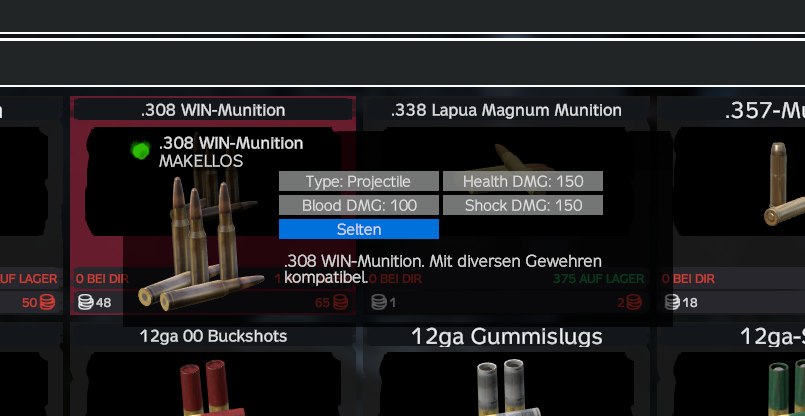
Expansion Market tooltip with NinjinTooltip stats
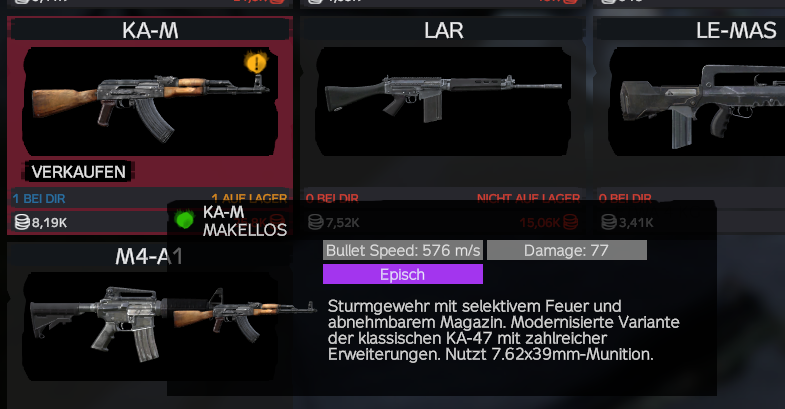
Weapon Stats in Market#
Weapons in the market display:
- Hitpoints
- Bullet Speed
- Damage
- Rate of Fire (RPM)
- DPS
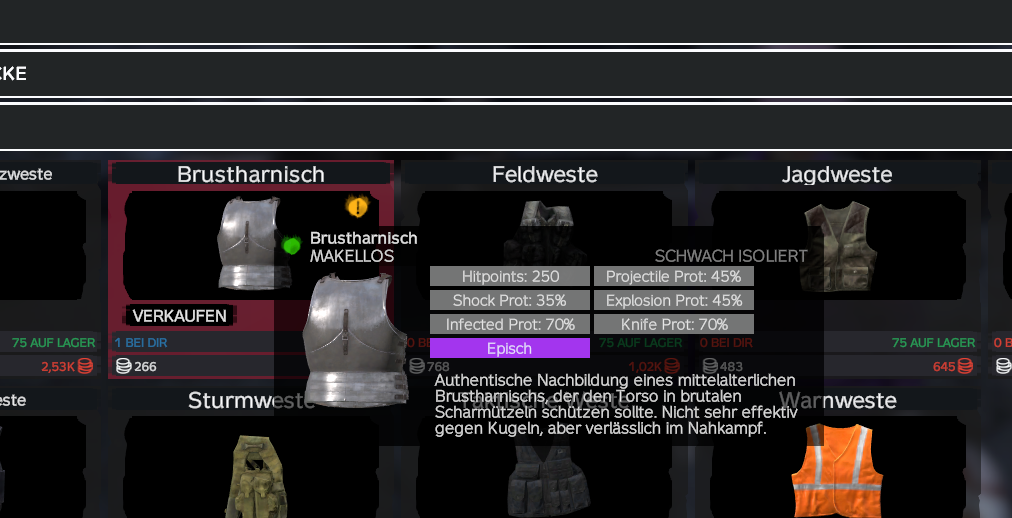
Armor Stats in Market#
Clothing/armor items display:
- Hitpoints
- Projectile Protection
- Shock Protection
- Explosion Protection
- Infected Protection
- Knife Protection
Enabling Market Stats#
Market stats are controlled by the ShowMarketStats option in TooltipConfig.json:
{
    "ShowMarketStats": true
}
Requirements:
- DayZ Expansion Market mod must be installed
ShowMarketStatsmust be enabled (enabled by default)- The mod automatically detects if Expansion Market is present
Note: Market stats use a simplified format optimized for the market UI, showing the most important statistics in a compact format.