Armor Stats#
NinjinTooltip displays comprehensive armor protection statistics, helping you understand how well your clothing protects against different damage types.
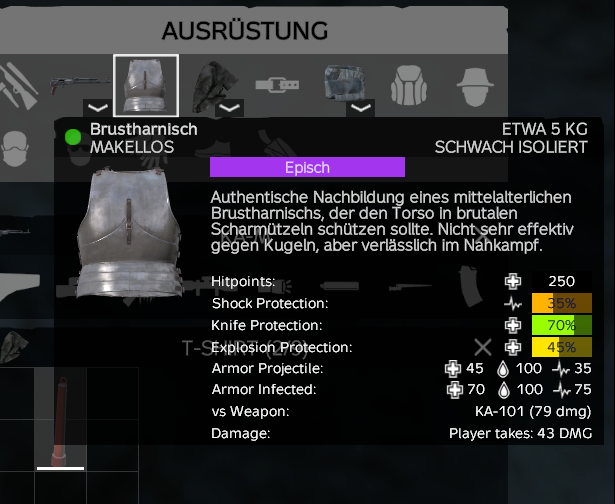
Armor stats displayed in inventory tooltip
Advanced Stats Menu#
Use the hotkey assigned in DayZ Hotkeys → NinjinsMods → Advanced Stats Menu on any armor/clothing item to open the Advanced Stats Menu, which displays comprehensive armor statistics including compatible repair kits.
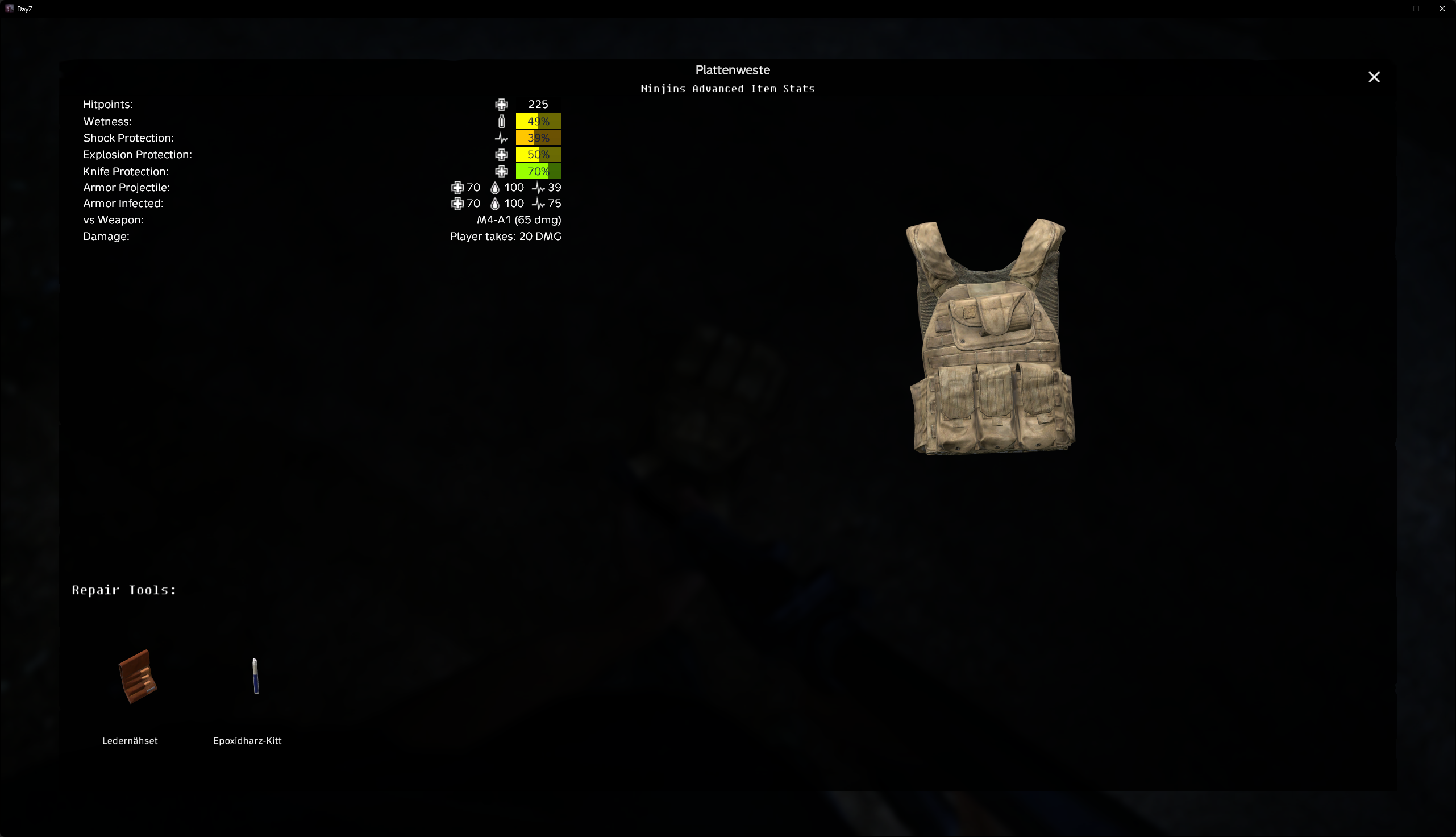
Advanced Stats Menu showing detailed armor protection values and repair kits
Protection Types#
Bio Protection#
Biological protection against diseases and infections. Displayed as a percentage.
- Read from
CfgVehicles Protection biological - Higher values provide better protection against biological agents
- Shown as a progress bar with color coding (green = good, red = poor)
Shock Protection#
Protection against shock damage from projectiles. Displayed as a percentage.
- Calculated from
DamageSystem GlobalArmor Projectile Shock damage - Formula:
(1 - damageValue) × 100 - Only shown if the value is between 0 and 1 (valid protection range)
- Shown as a progress bar
Knife Protection#
Protection against melee/knife damage. Displayed as a percentage.
- Calculated from
DamageSystem GlobalArmor Melee Health damage - Formula:
(1 - damageValue) × 100 - Higher values mean better protection against melee attacks
- Shown as a progress bar
Explosion Protection#
Protection against explosion damage (grenades, etc.). Displayed as a percentage.
- Calculated from
DamageSystem GlobalArmor FragGrenade Health damage - Formula:
(1 - damageValue) × 100 - Shown as a progress bar
Armor Projectile#
Protection against projectile damage (bullets) with a breakdown of Health, Blood, and Shock protection.
- Read from
DamageSystem GlobalArmor Projectile [Health/Blood/Shock] damage - Each component (Health, Blood, Shock) is displayed separately
- Formula for each:
(1 - damageValue) × 100 - Only shown if all values are valid (≤ 1.0)
- Displayed as:
Health% / Blood% / Shock%
Example: "Armor Projectile: 85% / 90% / 75%" means 85% health protection, 90% blood protection, and 75% shock protection.
Armor Infected#
Protection against infected (zombie) damage with Health, Blood, and Shock breakdown.
- Read from
DamageSystem GlobalArmor Infected [Health/Blood/Shock] damage - Same format as Armor Projectile
- Shows protection against zombie attacks
Weapon vs Armor Damage#
If you have a weapon in your hands while viewing armor, the tooltip will calculate and display:
- "vs Weapon" - Shows the weapon name and its calculated damage
- "Damage" - Shows how much damage the weapon will deal to you through this armor
- Formula:
weaponDamage × armorProjectileHealth - Only shown if
ShowArmorDamageis enabled in config
Note: The calculation uses your best armor piece (lowest damage multiplier) if you have multiple armor pieces equipped.
Understanding Protection Values#
Damage Multipliers#
DayZ uses damage multipliers in the config files. The tooltip converts these to protection percentages:
- Damage multiplier 0.1 = 90% protection (10% damage gets through)
- Damage multiplier 0.5 = 50% protection (50% damage gets through)
- Damage multiplier 1.0 = 0% protection (100% damage gets through)
The formula used: Protection% = (1 - damageMultiplier) × 100
Progress Bar Colors#
Protection values are displayed as progress bars with color coding:
- Green (100%) - Maximum protection
- Yellow (50%) - Moderate protection
- Red (0%) - No protection
The color gradient helps you quickly identify the protection level at a glance.
Best Armor Calculation#
When calculating weapon vs armor damage, the tooltip checks all equipped clothing slots:
- Headgear, Mask, Eyewear, Gloves, Armband
- Body, Hips, Vest, Back
- Legs, Feet
It selects the piece with the best protection (lowest damage multiplier) for the calculation, giving you the most optimistic damage estimate.